settings
Forum rules
Please be sure you are acquainted with the forum rules outlined within our FAQs.
Help support the site by using our Amazon Affiliate link when making any purchases from Amazon.
Please be sure you are acquainted with the forum rules outlined within our FAQs.
Help support the site by using our Amazon Affiliate link when making any purchases from Amazon.
-
The Subhuman

- Superstar

- Posts: 79084
- Joined: Wed Mar 24, 2010 10:03 am
- Location: God's own county
settings
seem to have lost my pm and personal settings link, also the log in/out link also gone...just me?
"A mind is like a parachute, it doesn't work if it's not open"
-
Twiggster

- MOT Legend

- Posts: 23104
- Joined: Thu May 22, 2003 2:31 pm
- Location: near København, DK
- Contact:
Re: settings
Probs cos I've banned you?faaip wrote:seem to have lost my pm and personal settings link, also the log in/out link also gone...just me?

Seriously tho - no probs here with pm/user control panel. No idea mate

-
The Subhuman
- Superstar
- Posts: 79084
- Joined: Wed Mar 24, 2010 10:03 am
- Location: God's own county
Re: settings
cheers ...definitely missing for me, if I've missed pm's I apologise...
"A mind is like a parachute, it doesn't work if it's not open"
-
Twiggster
- MOT Legend
- Posts: 23104
- Joined: Thu May 22, 2003 2:31 pm
- Location: near København, DK
- Contact:
Re: settings
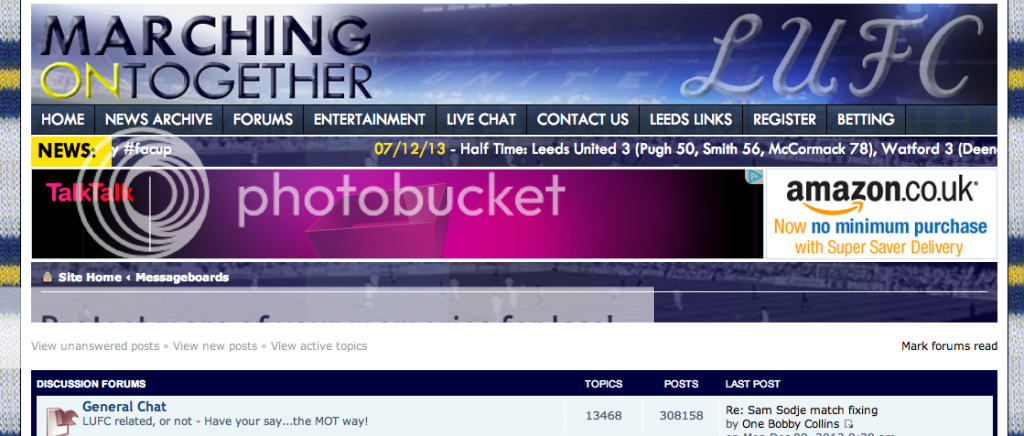
Can you post a screen shot pls Faaip? Top of your page I mean - under the header and scrolling news banner.faaip wrote:cheers ...definitely missing for me, if I've missed pm's I apologise...
Also - what browser you are using?
Thanks
-
The Subhuman
- Superstar
- Posts: 79084
- Joined: Wed Mar 24, 2010 10:03 am
- Location: God's own county
-
Twiggster
- MOT Legend
- Posts: 23104
- Joined: Thu May 22, 2003 2:31 pm
- Location: near København, DK
- Contact:
Re: settings
At 3AM - I'm not in a state to explain how to do that!faaip wrote:no idea how to do that

What do you see under the Amazon and ads top of the page? Should be two blue stripes - top one saying
"Site home <Messageboards<Discussion Forums<General Chat"
One under that with
"User Control Panel (New Messages). View your posts" ?
-
The Subhuman
- Superstar
- Posts: 79084
- Joined: Wed Mar 24, 2010 10:03 am
- Location: God's own county
Re: settings
I just have a blank blue line under the Site home line
"A mind is like a parachute, it doesn't work if it's not open"
-
HarryofOz

- Superstar
- Posts: 16442
- Joined: Tue Oct 21, 2003 10:46 am
Re: settings
The same thing happened to GW previously
viewtopic.php?f=1&t=29551&p=499689
As you can see Shields was going to check it out but I don't know what happened.
viewtopic.php?f=1&t=29551&p=499689
As you can see Shields was going to check it out but I don't know what happened.
Un Marcelo Bielsa, solo hay un Marcelo Bielsa. Gracias Marcello. Marsching on together.
-
1964white

- Lord Southwold

- Posts: 155330
- Joined: Tue Mar 30, 2010 8:46 am
- Twitter: @1964white
Re: settings
faaip wrote:I just have a blank blue line under the Site home line
I had the same problem last week which appears to have rectified itself
-
The Subhuman
- Superstar
- Posts: 79084
- Joined: Wed Mar 24, 2010 10:03 am
- Location: God's own county
Re: settings
It's not a problem, I just won't know if I've been pm'd (while it lasts)...I can adjust settings by clicking on my own name in one of my posts
"A mind is like a parachute, it doesn't work if it's not open"
-
Martyn

- Superstar
- Posts: 10635
- Joined: Sun Mar 21, 2010 10:47 am
- Twitter: @MartynStead
- Location: and Momentum both uncertain
Re: settings
On my iMac running Chrome I have never had the bar back, on my MacBook on Chrome I have it.HarryofOz wrote:The same thing happened to GW previously
viewtopic.php?f=1&t=29551&p=499689
As you can see Shields was going to check it out but I don't know what happened.
If you receive a PM the popup still tells you and you can reply, but without the settings bar you can't initiate a PM. I will send faaip a test PM to check he sees it
Bates, GFH, Cellino: Same s**t, different arseholes.
-
gessa
Re: settings
I have the same problem on my laptop, have had for some time,I had once before but it returned to normal. I know Lovely Leeds had the problem too
Fine on my phone though.
Fine on my phone though.
-
Martyn
- Superstar
- Posts: 10635
- Joined: Sun Mar 21, 2010 10:47 am
- Twitter: @MartynStead
- Location: and Momentum both uncertain
-
Martyn
- Superstar
- Posts: 10635
- Joined: Sun Mar 21, 2010 10:47 am
- Twitter: @MartynStead
- Location: and Momentum both uncertain

-
Ronan

- Manager

- Posts: 2898
- Joined: Tue Jan 05, 2010 4:39 pm
- Location: Belfast
Re: settings
Try a different browser...and ad blocking on maybe ??
Most plagiarists, like the drone, have neither taste to select, industry to acquire, nor skill to improve, but impudently pilfer the honey ready prepared, from the hive......
-
The Subhuman
- Superstar
- Posts: 79084
- Joined: Wed Mar 24, 2010 10:03 am
- Location: God's own county
Re: settings
ad block not on this laptop
I see what GW has got on his screenshot
once I've posted this I can click on my name and get access to my pm's...
I see what GW has got on his screenshot
once I've posted this I can click on my name and get access to my pm's...
"A mind is like a parachute, it doesn't work if it's not open"
-
gessa
Re: settings
same for mefaaip wrote:ad block not on this laptop
I see what GW has got on his screenshot
once I've posted this I can click on my name and get access to my pm's...
-
Twiggster
- MOT Legend
- Posts: 23104
- Joined: Thu May 22, 2003 2:31 pm
- Location: near København, DK
- Contact:
Re: settings
Moved this thread to Site Help forum. Hoping Adam will see it quicker if he's only glancing at GC. 
-
YorkshireSquare

- Administrator

- Posts: 15044
- Joined: Sun May 18, 2003 1:34 pm
- Twitter: @motforum
- Location: Leeds
- Contact:
Re: settings
Showing for me in IE10 and Chrome, not sure why it is doing it now for some people. It used to not show in Chrome but I fixed that.
I seem to remember it not working in IE11 so will have to reinstall that and test.
I seem to remember it not working in IE11 so will have to reinstall that and test.
-
The Subhuman
- Superstar
- Posts: 79084
- Joined: Wed Mar 24, 2010 10:03 am
- Location: God's own county
Re: settings
Shields53 wrote:Showing for me in IE10 and Chrome, not sure why it is doing it now for some people. It used to not show in Chrome but I fixed that.
I seem to remember it not working in IE11 so will have to reinstall that and test.
don't make it a priority,
"A mind is like a parachute, it doesn't work if it's not open"